


Every Monday, host Claire Vo shares a 30- to 45-minute episode with a new guest demoing a practical, impactful way they’ve learned to use AI in their work or life. No pontificating—just specific and actionable advice.
Advanced Claude Code techniques: context loading, mermaid diagrams, stop hooks, and more

Brought to you by:
John Lindquist (co-founder of egghead.io) shares a practical, senior-level playbook for using AI coding tools like Claude Code and Cursor without the usual chaos: why rich context beats clever prompting, how mermaid diagrams can compress your entire app into something AI actually understands, how to use system prompts and stop hooks to automate quality checks and commits, and why building fast, disposable prototypes is often the best way to think.
Detailed workflow walkthroughs from this episode:
• Beyond Vibe Coding: Advanced AI Engineering with John Lindquist: https://www.chatprd.ai/how-i-ai/advanced-ai-engineering-claude-code-john-lindquist
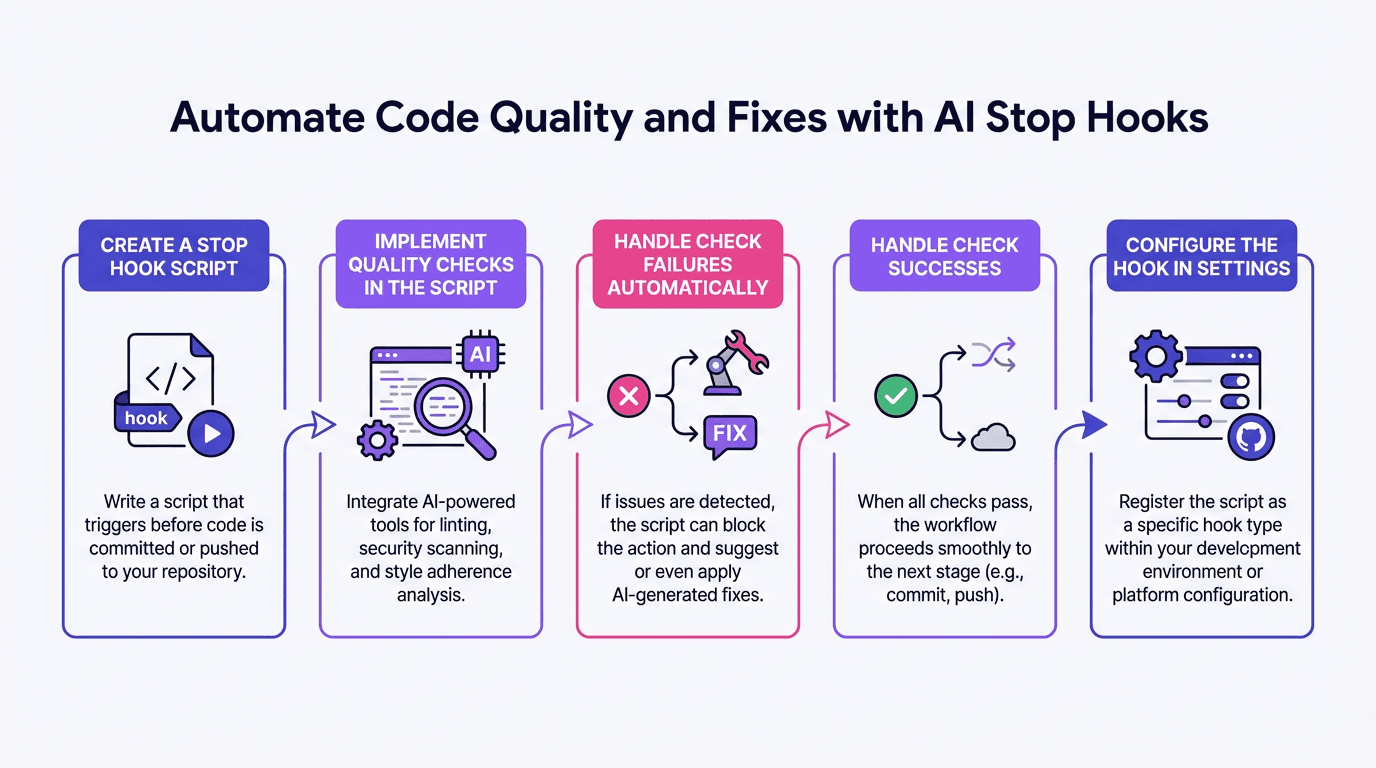
• Automate Code Quality and Fixes with AI Stop Hooks: https://www.chatprd.ai/how-i-ai/workflows/automate-code-quality-and-fixes-with-ai-stop-hooks
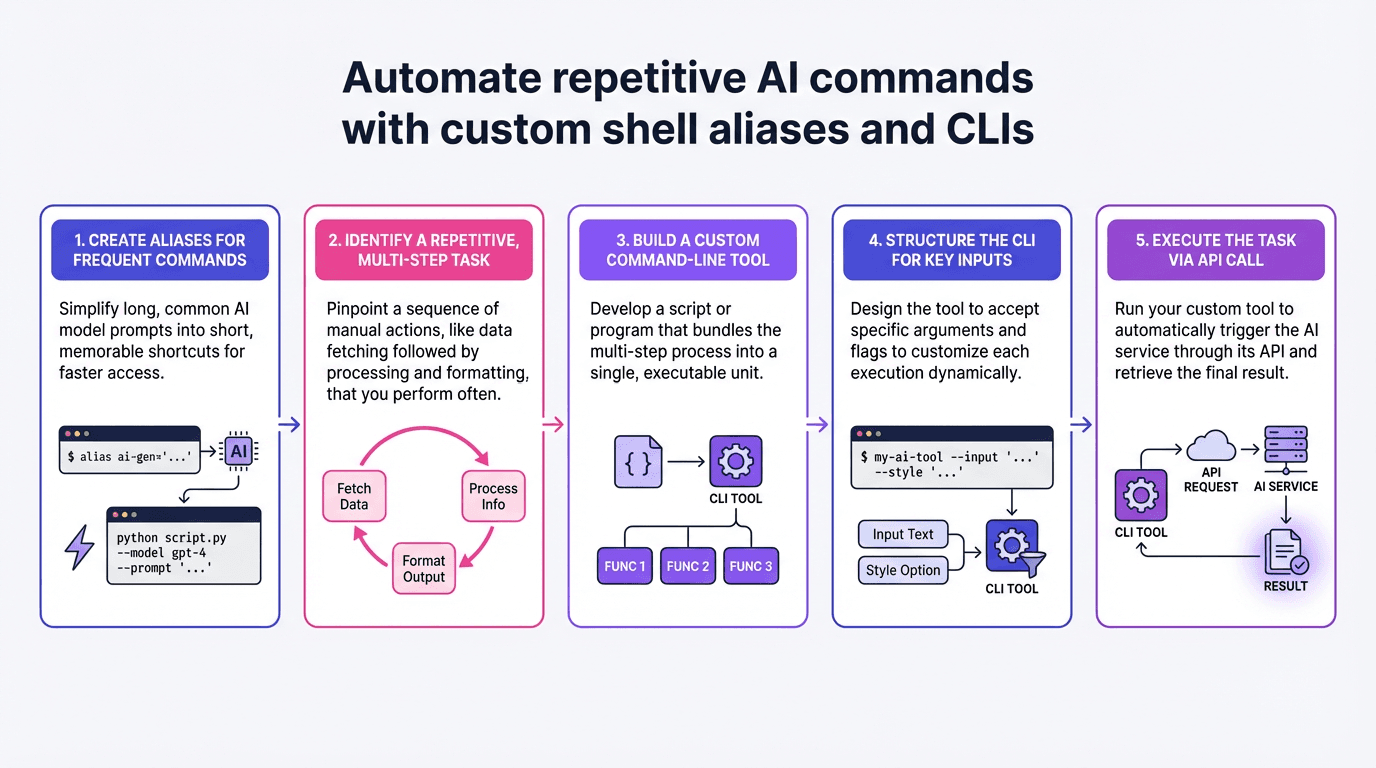
• Automate Repetitive AI Commands with Custom Shell Aliases and CLIs: https://www.chatprd.ai/how-i-ai/workflows/automate-repetitive-ai-commands-with-custom-shell-aliases-and-clis
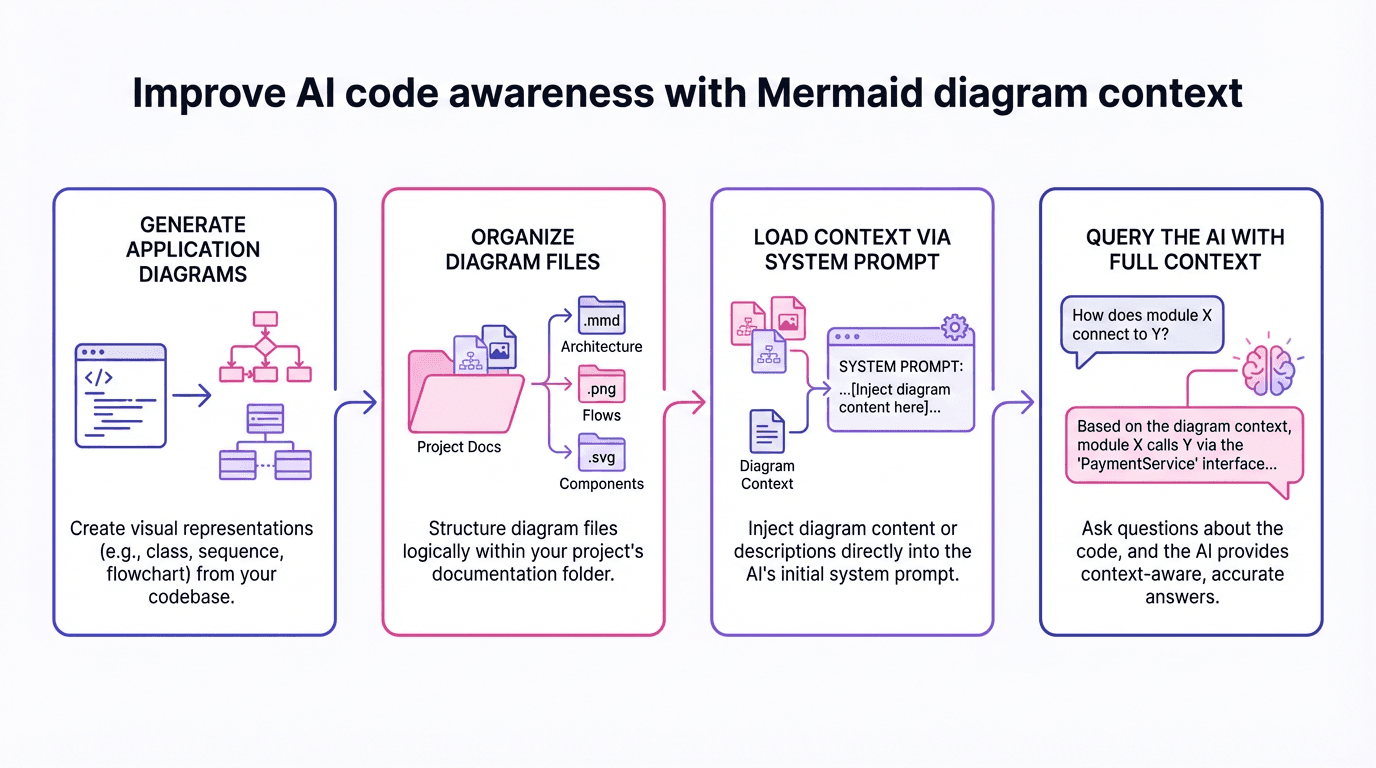
• Improve AI Code Awareness with Mermaid Diagram Context: https://www.chatprd.ai/how-i-ai/workflows/improve-ai-code-awareness-with-mermaid-diagram-context
Biggest takeaways:
Context and diagrams are the best way to get AI to do what you want. Most engineers focus on prompting but neglect providing rich context about how their application works. Mermaid diagrams in markdown files can compress your application flow into a format that’s easy for AI to understand. By preloading this context, you get faster, more accurate results without the AI having to explore your codebase.
The “append system prompt” command in Claude Code is severely underused. This powerful command lets you inject context before any user interaction begins. By combining it with file reading commands like `cat`, you can load entire directories of documentation and diagrams into Claude’s context. This costs more tokens up front but dramatically improves the quality and speed of responses, eliminating file reads and code exploration.
Use stop hooks to automate quality checks and commits. Claude Code’s hooks feature can run scripts when the AI stops generating content. This allows you to automatically check for TypeScript errors, linting issues, or code quality problems and feed those errors back to Claude to fix. You can even set up conditional commits when code passes all checks, eliminating manual steps in your workflow.
Create aliases for your most common AI commands. Setting up shell aliases (like `cdi` for loading diagrams or `x` for dangerous mode) dramatically speeds up your workflow. Instead of typing long commands repeatedly, you can create project-specific shortcuts that load the right context for different codebases or tasks, making AI tools feel like a natural extension of your development environment.
This is the era of the file type. Different file formats can now be used in ways that weren’t practical before. Mermaid diagrams, which are difficult for humans to parse, are perfect for machines. Consider what file types might best compress information for AI consumption, even if they’re not ideal for human reading. This shift in thinking about documentation can make your AI tools dramatically more effective.
Planning modes have dramatically reduced AI drift. The recent planning features in tools like Claude Code and Cursor have significantly improved the quality of AI-generated code by forcing the AI to think through the solution before implementing it. For anything beyond small file changes, using planning mode can prevent the common problem of AI going off in unintended directions.
Build every idea you have. John’s philosophy is to immediately prototype any idea that comes to mind, using dictation to brain dump into a terminal and letting AI build a first version. Even if the result is wrong, it’s easier to iterate on something than nothing. This “build, then refine” approach leverages AI’s strength in generating initial code while allowing human judgment to guide refinement.
▶️ Listen now on YouTube | Spotify | Apple Podcasts
If you’re enjoying these episodes, reply and let me know what you’d love to learn more about: AI workflows, hiring, growth, product strategy—anything.
Catch you next week,
Lenny
P.S. Want every new episode delivered the moment it drops? Hit “Follow” on your favorite podcast app.