

Every Monday, host Claire Vo shares a 30- to 45-minute episode with a new guest demoing a practical, impactful way they’ve learned to use AI in their work or life. No pontificating—just specific and actionable advice.
How this AI PM uses MCPs to automate his meeting prep, CRM updates, and customer feedback synthesis | Reid Robinson (Zapier)
Brought to you by:
Reid Robinson of Zapier reframes MCPs as app connectors for your AI—and shows how, when paired with Claude Projects, they turn Claude into an always-on teammate. By giving the model clear, persistent instructions on how to use tools and sequence actions, Reid automates the most hated work: CRM updates, meeting prep, and customer feedback analysis. His core insight is simple but powerful: stop “using” AI and start building systems that run in the background. The guiding question—“If you could run ChatGPT in your sleep, what would you have it do?”
Detailed workflow walkthroughs from this episode:
• How I AI: Reid Robinson’s Zapier Workflows for CRM Automation, Meeting Prep, and Feedback Loops: https://www.chatprd.ai/how-i-ai/zapier-workflows-for-crm-automation-meeting-prep
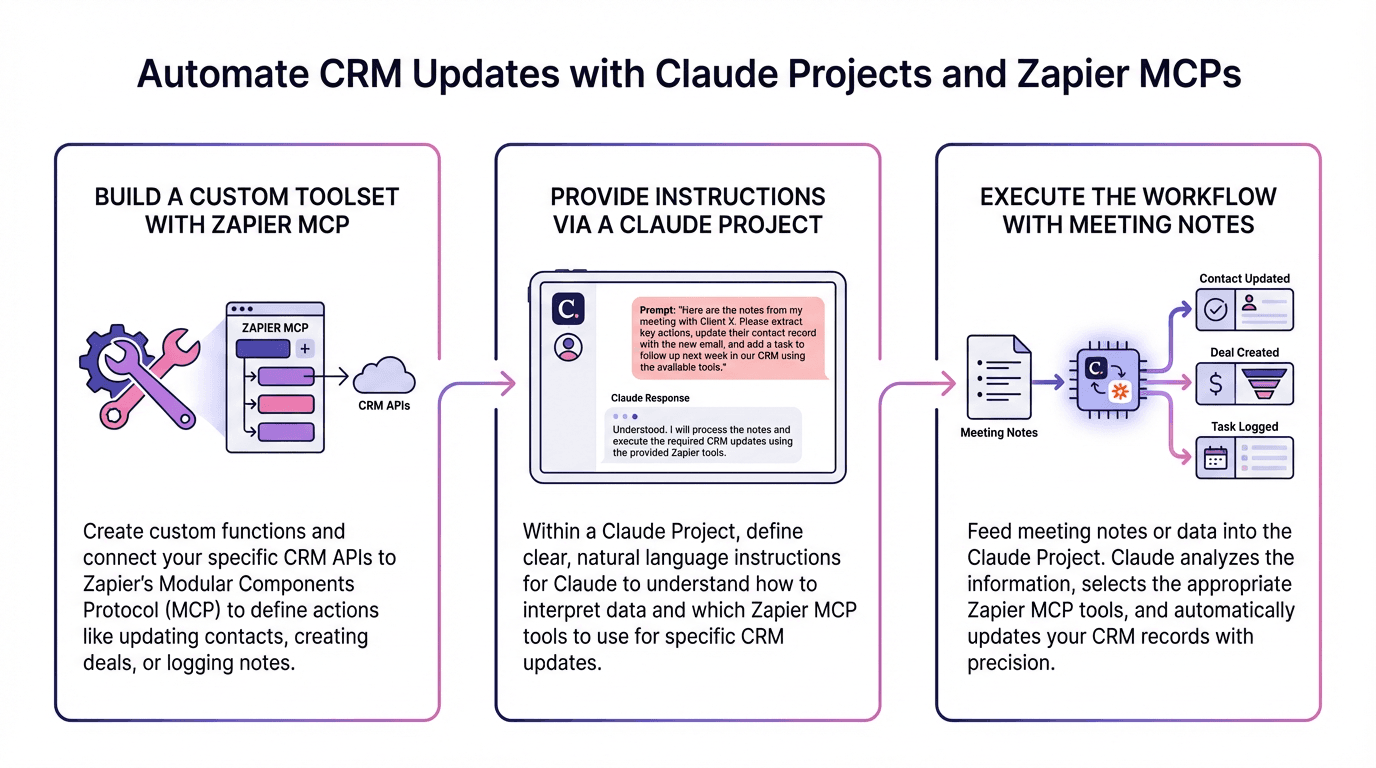
• Automate CRM Updates with Claude Projects and Zapier MCPs: https://www.chatprd.ai/how-i-ai/workflows/automate-crm-updates-with-claude-projects-and-zapier-mcps
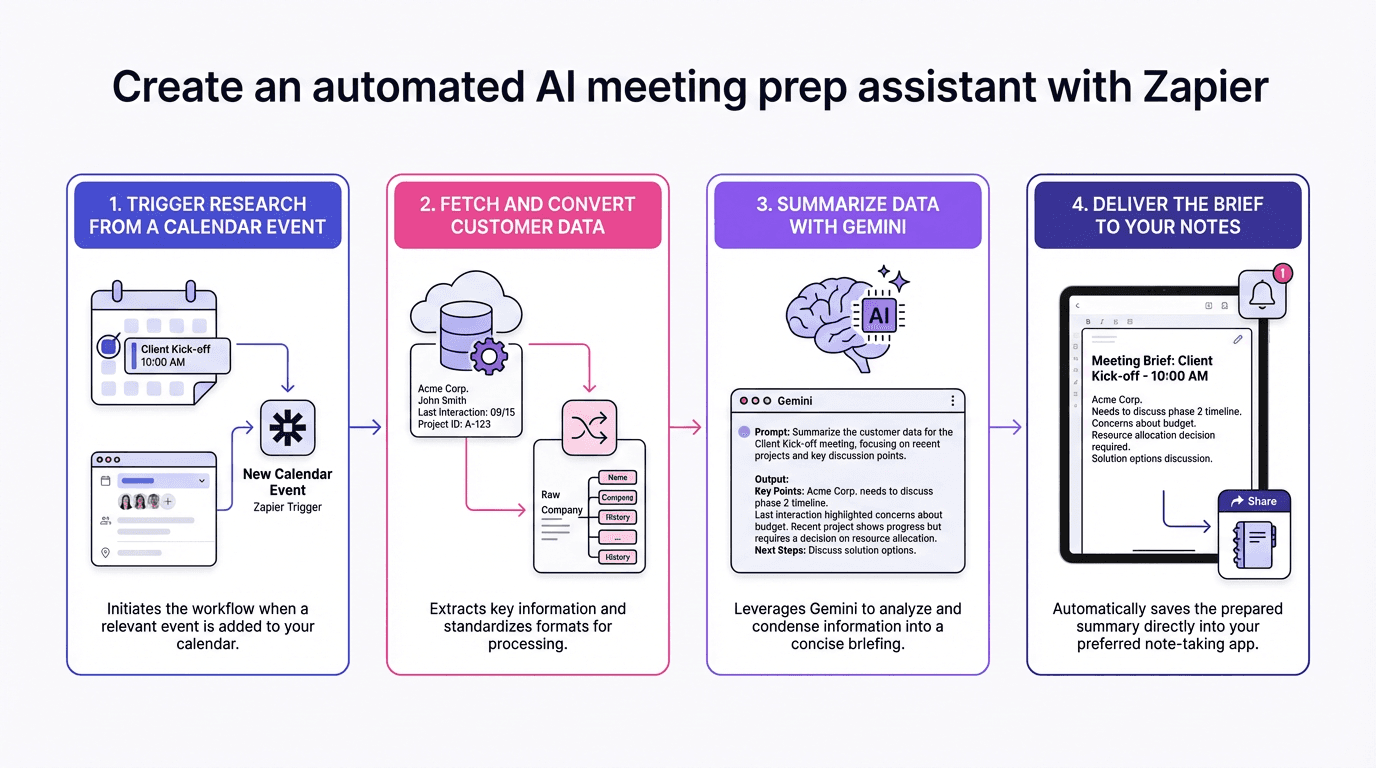
• Create an Automated AI Meeting Prep Assistant with Zapier: https://www.chatprd.ai/how-i-ai/workflows/create-an-automated-ai-meeting-prep-assistant-with-zapier
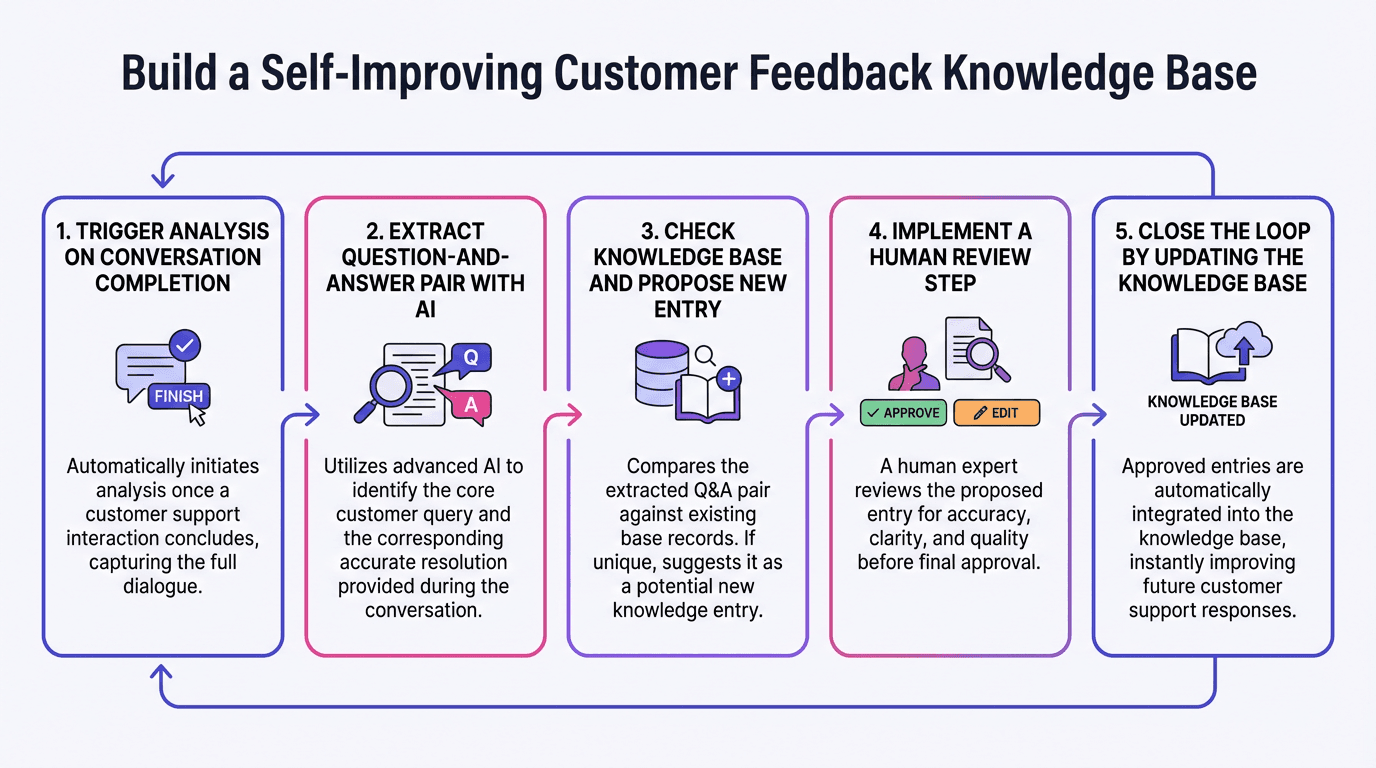
• Build a Self-Improving Customer Feedback Knowledge Base: https://www.chatprd.ai/how-i-ai/workflows/build-a-self-improving-customer-feedback-knowledge-base
Biggest takeaways:
MCPs are simply “app connectors for your AI.” Don’t get caught up in the technical jargon—MCPs just give your AI tools access to your apps, either to retrieve knowledge or take actions. This mental model makes them much easier to understand and implement.
Claude Projects is the secret to effective MCP usage. Reid uses Claude Projects to provide detailed instructions on tool usage, sequence, and data handling. This makes Claude much better at executing complex workflows across multiple tools, solving one of the biggest challenges with MCPs.
Automated CRM updates eliminate one of the most universally hated tasks. Reid’s system automatically logs meeting notes, updates records, and maintains customer information without manual effort. This is especially valuable for customer-facing teams, who typically hate updating CRMs.
“If you could run ChatGPT in your sleep, what would you do?” This thought experiment helps people discover valuable AI use cases by removing the constraint of active participation. The answer often reveals tasks that can be automated with the right AI workflow.
▶️ Listen now on YouTube | Spotify | Apple Podcasts
“Anyone can cook”: How v0 is bringing Git workflows to vibe coding | Guillermo Rauch (Vercel CEO)
Guillermo Rauch, CEO of Vercel, demonstrates what it looks like when AI moves from demos to real production. In this episode, he shows how v0 now supports the full Git workflow—branches, previews, and pull requests—so real features can be built, reviewed, and shipped without traditional setup. You’ll see how Vercel built skills.sh, a viral AI skills marketplace with 34,000+ submissions, entirely inside v0—and how non-technical teammates can safely make production changes. We also unpack what this shift means for modern product teams, and why “who can ship” is about to change forever.
Detailed workflow walkthroughs from this episode:
• How I AI: Guillermo Rauch (Vercel CEO) on how to vibe code to production with v0: https://www.chatprd.ai/how-i-ai/vercel-ceo--guillermo-rauchs-production-ready-v0-workflows
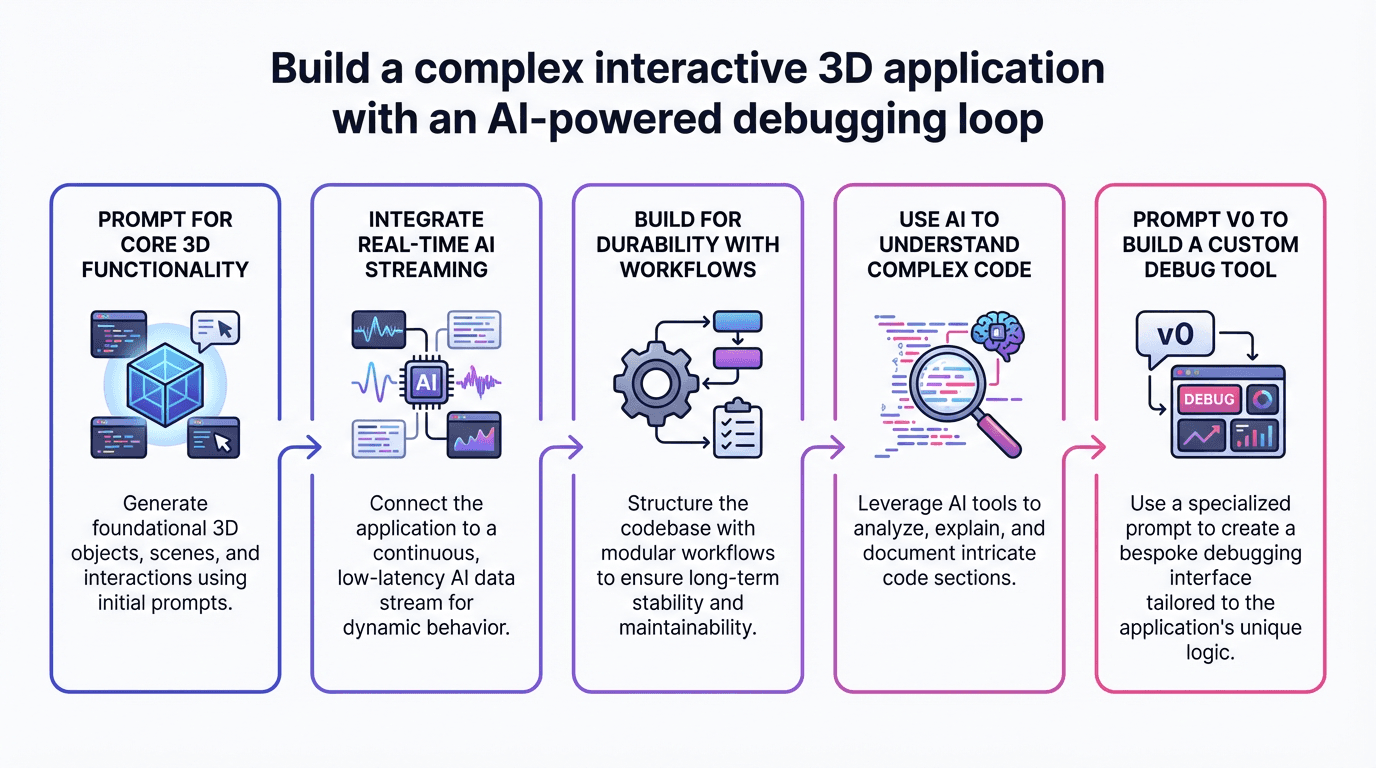
• Build a Complex Interactive 3D Application with an AI-Powered Debugging Loop: https://www.chatprd.ai/how-i-ai/workflows/build-a-complex-interactive-3d-application-with-an-ai-powered-debugging-loop
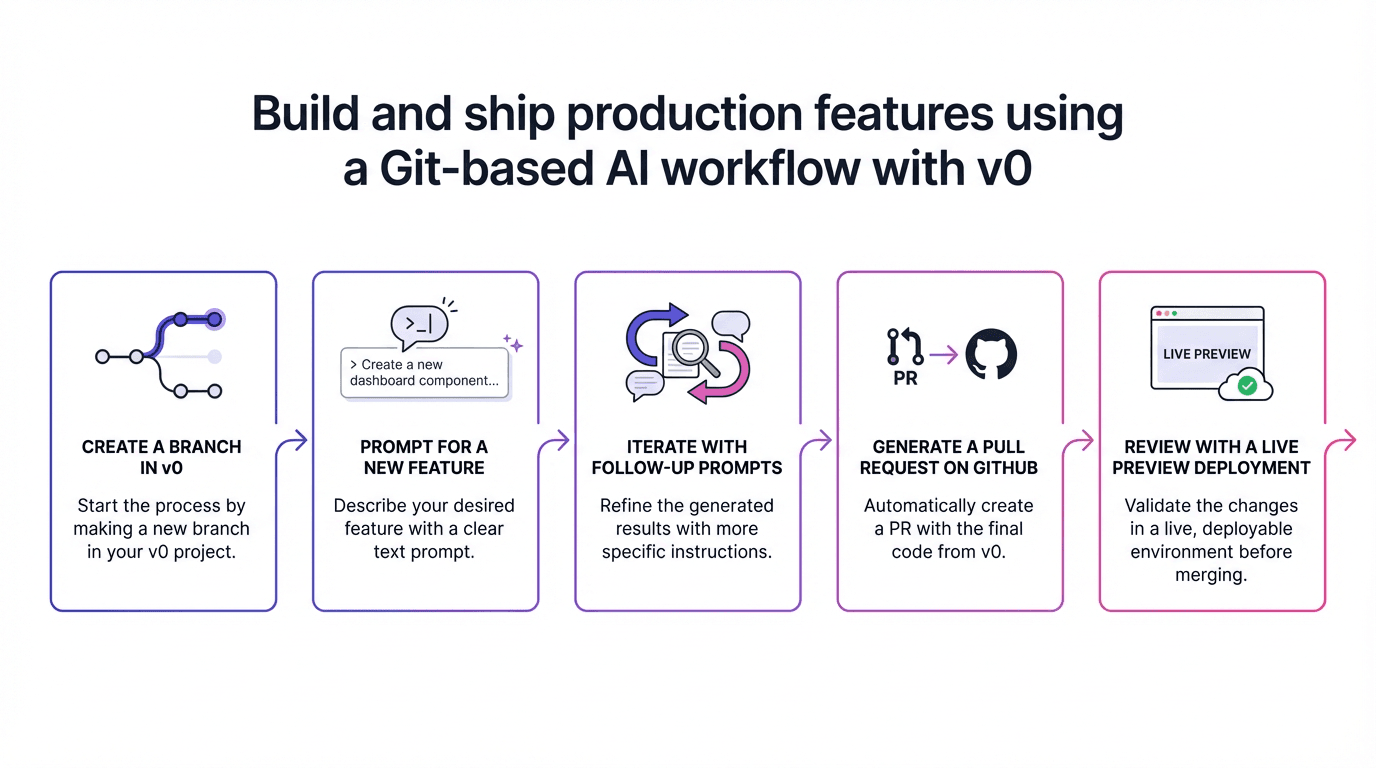
• Build and Ship Production Features Using a Git-Based AI Workflow with v0: https://www.chatprd.ai/how-i-ai/workflows/build-and-ship-production-features-using-a-git-based-ai-workflow-with-v0
Biggest takeaways:
v0 has evolved from a prototype tool into a production-grade development environment. Guillermo demonstrates how v0 now integrates with Git workflows, allowing anyone to create branches, make changes, and submit pull requests that can be reviewed and merged into production.
skills.sh was conceived and built entirely in v0. The viral marketplace for AI skills (which reached 35,000 community submissions) was built using the same tool it promotes. Guillermo explains how the “terminal core” design and entire implementation were prompted and built collaboratively through v0, then deployed on Vercel’s infrastructure.
Three-sentence prompts can create production-ready features. Guillermo demonstrates adding a rating system to skills.sh with just three short sentences: “Add a five-star rating system for skills. Put it on the sidebar. Be mindful of abuse.” v0 not only implemented the feature but also considered production concerns like rate limiting.
v0 democratizes development by removing environment setup friction. Claire highlights how v0 eliminates the “nightmare” of local environment setup (installing Homebrew, dependencies, etc.), making development more accessible to designers and non-technical team members while teaching them real engineering practices.
The future of v0 includes agent creation and workflow management. Guillermo hints at upcoming capabilities that will make it easier to build agents that leverage Vercel’s workflow engine for reliability, enabling both visual applications and “headless” background agents that can perform tasks asynchronously.
▶️ Listen now on YouTube | Spotify | Apple Podcasts
If you’re enjoying these episodes, reply and let me know what you’d love to learn more about: AI workflows, hiring, growth, product strategy—anything.
Catch you next week,
Lenny
P.S. Want every new episode delivered the moment it drops? Hit “Follow” on your favorite podcast app.