


Claude Opus 4.6 vs GPT-5.3 Codex: Which is the better software engineer?

Brought to you by WorkOS—Make your app enterprise-ready today
Claire put GPT-5.3 Codex and Claude Opus 4.6 head-to-head on real work—redesigning her marketing site, refactoring complex components, and shipping production code. In five days, she shipped 44 PRs, touched 1,088 files, and added 93,000 lines of code (and deleted 87,000). Her big insight: It’s not Opus or Codex. It’s Opus for building and Codex for reviewing.
Detailed workflow walkthroughs from this episode:
• How I AI: GPT-5.3 Codex vs. Claude Opus 4.6—Shipping 44 PRs in 5 Days: https://www.chatprd.ai/how-i-ai/gpt-5-3-codex-vs-claude-opus-4-6
• How to Combine Claude Opus and GPT-5.3 Codex for High-Velocity Code Refactoring: https://www.chatprd.ai/how-i-ai/workflows/how-to-combine-claude-opus-and-gpt-5-3-codex-for-high-velocity-code-refactoring
• How to Redesign a Marketing Website Using Claude Opus 4.6 for Creative Development: https://www.chatprd.ai/how-i-ai/workflows/how-to-redesign-a-marketing-website-using-claude-opus-4-6-for-creative-development
Biggest takeaways:
AI coding tools have reached an inflection point for productivity. Claire shipped 44 PRs containing 98 commits across 1,088 files in just five days—adding 93,000 lines of code and removing 87,000. This included major features like MCP integrations and complete component refactors that would have taken months with a traditional team.
The perfect AI engineering workflow combines both models. Claire’s most productive approach was having Opus build features (getting them 80% to 90% complete) and then using Codex to review the code and find edge cases, before returning to Opus to implement the fixes. This mimics a junior–senior developer relationship.
Opus 4.6 is the “eager product engineer” who actually builds things. It’s excellent at planning and executing long-running, creative tasks. While its initial design output wasn’t great, it responded well to feedback and ultimately produced a much better redesign than Codex—one that Claire plans to ship to production.
GPT-5.3 Codex is the “principal engineer who won’t build anything.” Claire found that while Codex excels at reviewing code and finding edge cases, it struggles with creative, greenfield work. It follows instructions too literally and overfits to the last prompt, making it frustrating for tasks like redesigning a website from scratch.
The harness matters as much as the model. Claire found that Cursor’s interface worked better with both models than Codex’s native app. Features like plan mode, to-dos, and exploration tools in Cursor helped get better results from Opus than might have been possible in Claude Code.
Opus 4.6 Fast is blazingly fast but expensive. At roughly $150 per million output tokens (six times the price of standard Opus), it’s a significant investment. Claire embraces a “token abundance mindset” because the ROI is still massive compared with traditional development costs.
Codex brings Git concepts front and center in its interface. The app emphasizes repositories, branches, work trees, diffs, and pull requests—making it both powerful for experienced developers and educational for those learning Git concepts. This visual approach to Git is more accessible than command-line tools.
Skills and automations are becoming first-class citizens in AI coding tools. Codex presents these as visual components with icons and buttons rather than ZIP files, making them more accessible. The included recommended skills and automations provide good starting points for developers.
▶️ Listen now on YouTube | Spotify | Apple Podcasts
How this visually impaired engineer uses Claude Code to make his life more accessible | Joe McCormick

Brought to you by Tines—Start building intelligent workflows today
Joe McCormick is a principal engineer at Babylist who lost most of his central vision right before college. Instead of stepping away from software, he doubled down. And now, with tools like Claude Code, he’s building small, AI-powered Chrome extensions that make his life dramatically more accessible. In this episode, Joe live-builds “micro apps” that describe Slack images, fix typos instantly, and summarize links—all triggered with simple keyboard shortcuts.
Detailed workflow walkthroughs from this episode:
• How I AI: Building Custom AI Accessibility Tools for Slack with Joe McCormick & Claude Code: https://www.chatprd.ai/how-i-ai/custom-ai-accessibility-tools-for-slack-claude-code
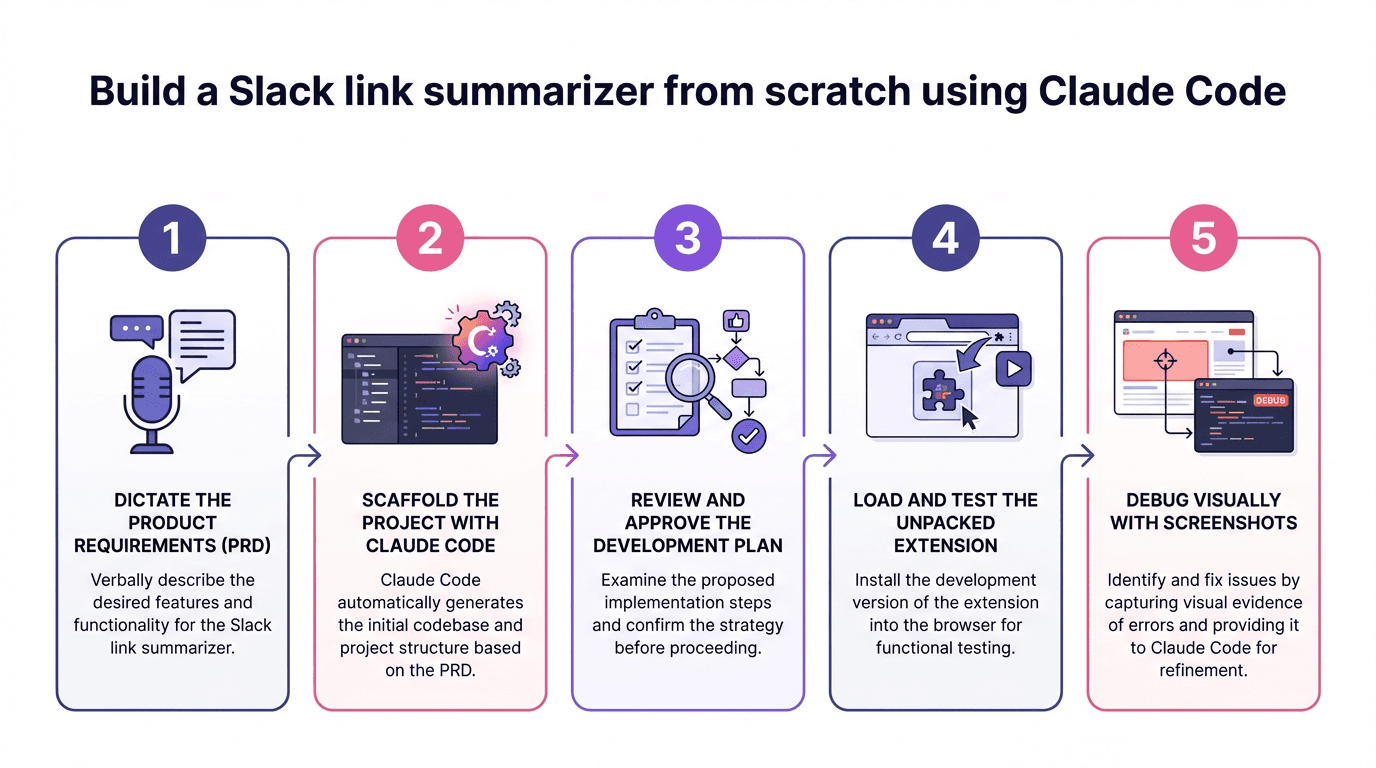
• Build a Slack Link Summarizer from Scratch using Claude Code: https://www.chatprd.ai/how-i-ai/workflows/slack-link-summarizer-using-claude-code
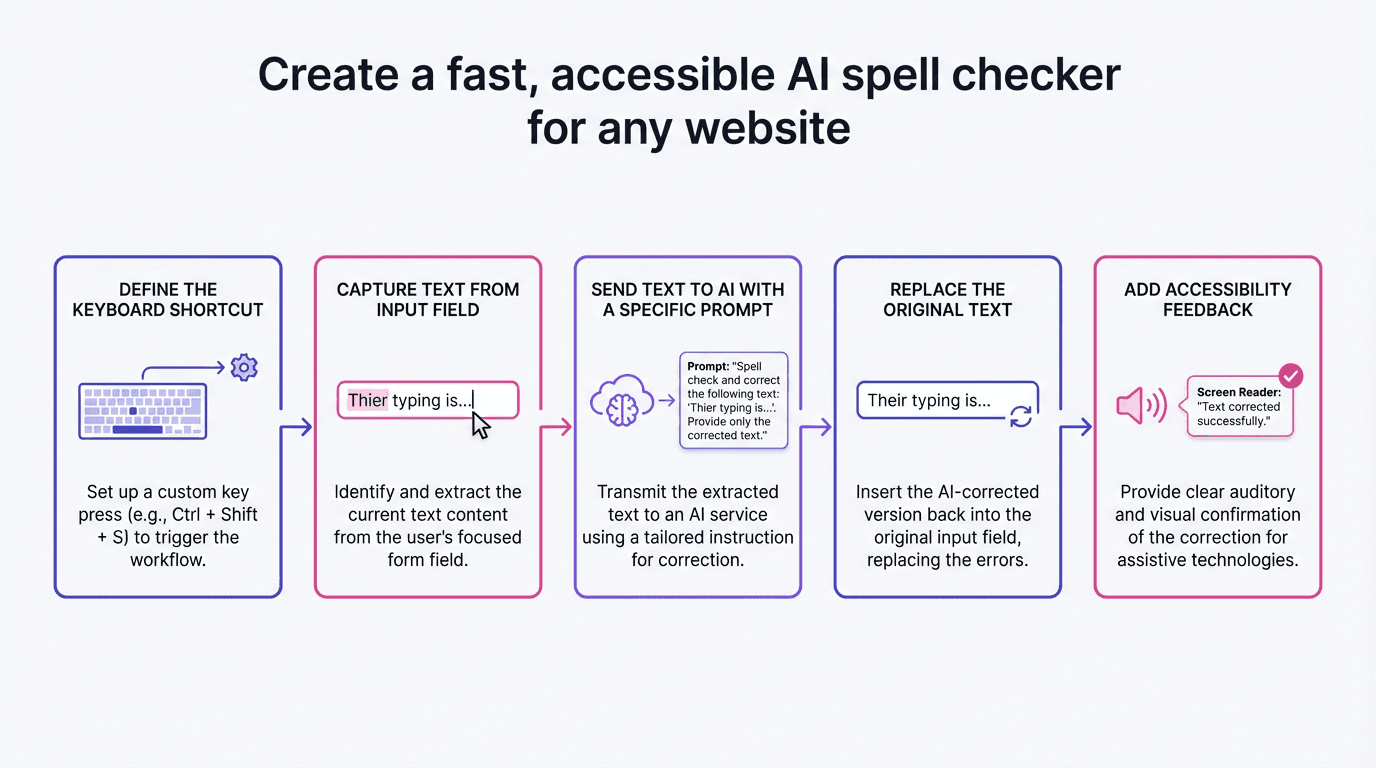
• Create a Fast, Accessible AI Spell Checker for Any Website: https://www.chatprd.ai/how-i-ai/workflows/accessible-ai-spell-checker-for-any-website
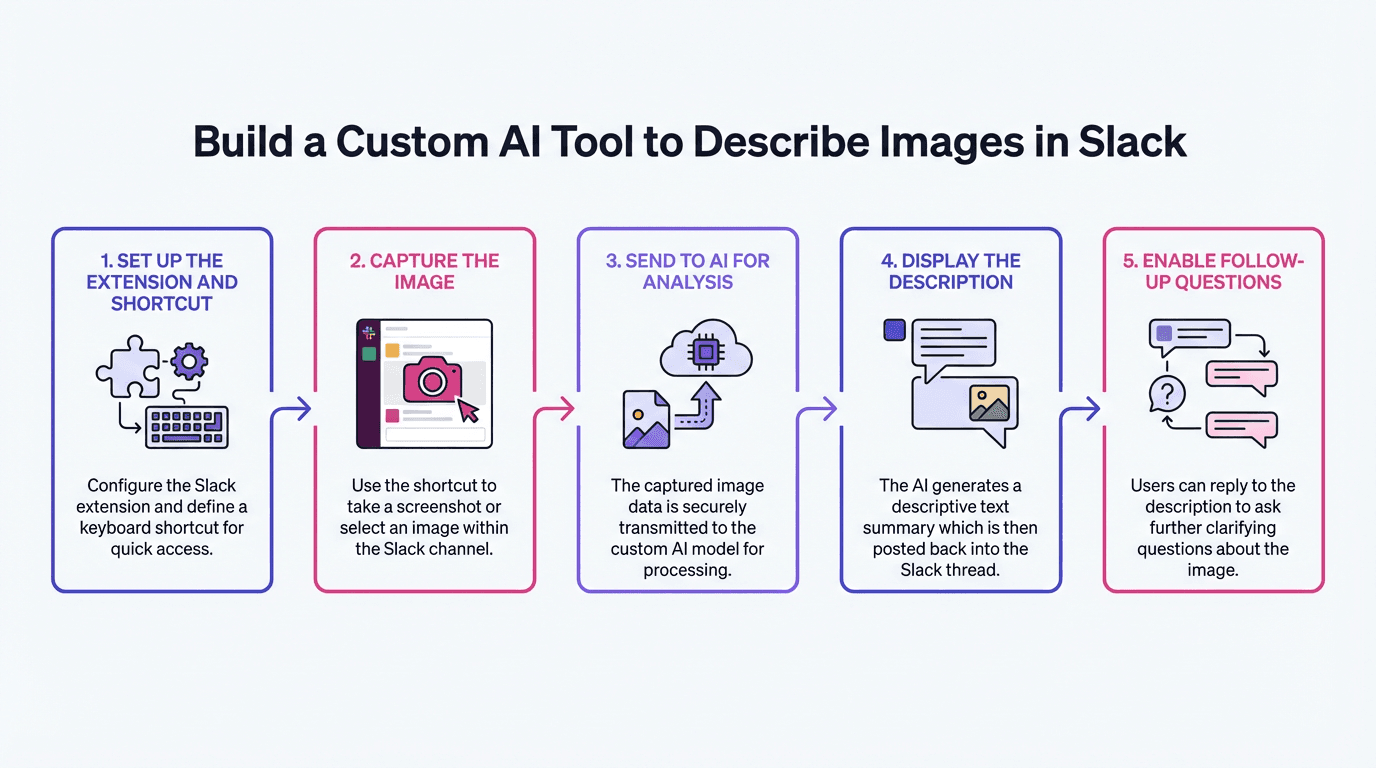
• Build a Custom AI Tool to Describe Images in Slack: https://www.chatprd.ai/how-i-ai/workflows/ai-tool-to-describe-images-in-slack
Biggest takeaways:
AI is closing the gap between sighted and visually impaired engineers. As Joe explains, “The gap between a software engineer for a sighted person and a visually impaired person is closing day by day.” AI tools allow him to work more efficiently by eliminating accessibility barriers that previously required tedious workarounds.
Claude Code can be made more screen-reader-friendly with simple techniques. Joe demonstrates several accessibility improvements: using Control+G to edit prompts in a text editor instead of the terminal, creating a sound alert when Claude needs input, and leveraging consistent keyboard patterns (1 for yes, 2 for variations, 3 for no) to navigate options without visual cues.
Multimodal AI has transformed personal moments beyond work. Joe shares how Gemini allows him to read any book to his children, something previously impossible without memorizing the text. “I was always afraid of not being able to read stories to my kids. That ‘Sorry, I can’t’ has become ‘Sorry, I can,’ with the assistance of so many different tools now.’”
Keyboard shortcuts dramatically improve accessibility efficiency. Joe demonstrates how triggering extensions with keyboard combinations (Ctrl+Shift+D for image descriptions, Ctrl+Shift+S for spell-checking) eliminates multiple clicks and context switches. For someone using a screen reader and 10x magnification, these shortcuts transform tedious tasks into instant actions.
Running Slack in Chrome instead of as a desktop app enables powerful customizations. This clever workaround allows Joe to extend Slack’s functionality with Chrome extensions, something impossible with the desktop app. This approach could work for many other web-based tools that offer both desktop and browser versions.
Creating Claude Skills accelerates repetitive development tasks. After building his first two Chrome extensions, Joe created a Claude Skill to extract common patterns, making each subsequent extension faster to develop. This compounding efficiency means his fifth extension will take a fraction of the time of his first one.
▶️ Listen now on YouTube | Spotify | Apple Podcasts
If you’re enjoying these episodes, reply and let me know what you’d love to learn more about: AI workflows, hiring, growth, product strategy—anything.
Catch you next week,
Lenny
P.S. Want every new episode delivered the moment it drops? Hit “Follow” on your favorite podcast app.